User Guide
Welcome to Our Investment Platform
Thank you for joining our platform. This website allows you to invest in Gold trading using crypto(USDT TRC20 required) and earn returns on your investment through our automated plans. Our system is designed to be simple, transparent, and easy for beginners.
Whether you want to make your first deposit, track your daily earnings, or withdraw your profits, this guide will help you understand every step clearly.
What You Can Do on Your Account
Create and manage your profile
Deposit using USDT on the TRC20 network
Earn returns based on the plan you choose
Withdraw profits to your wallet
Contact support anytime through live chat or WhatsApp
Where to start
Creating an account is the first step before you can deposit or invest. Follow these steps to register successfully!!
Step 1: Creating an account
When you open our platform for the first time creating an account is required, fill in the details with a valid TRC20 wallet for withdraw and click REGISTER
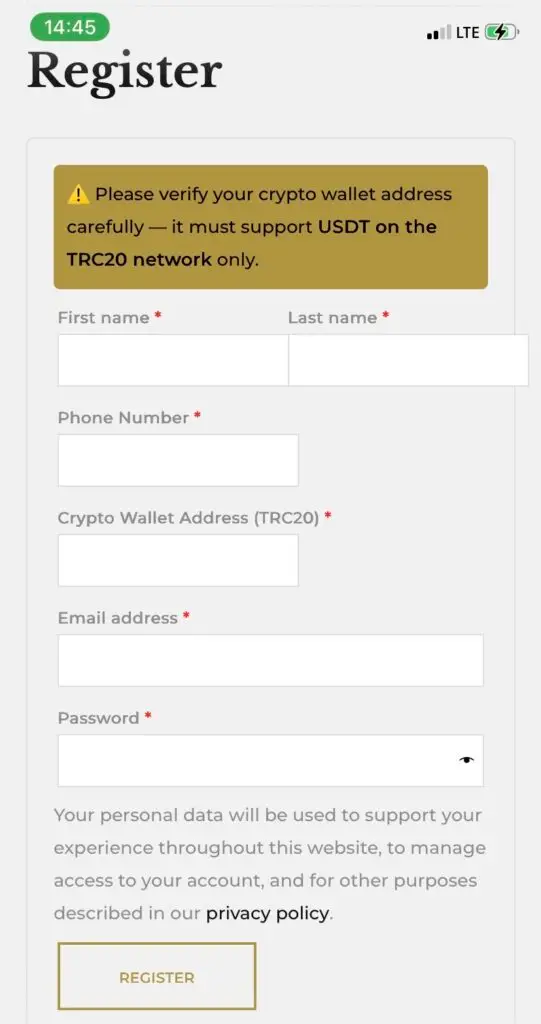
Don’t have a crypto wallet yet? Click the link or the image below to create your account with NOW WALLET

Step 2: How to add your crypto wallet address
In your wallet App, (NOW WALLET or BINANCE), or any other crypto wallet, follow the instructions below to see your exact USDT (TRC20) wallet address to paste in your Crypto wallet field.
Step 2.1 Locate your receiving account
After creating a crypto wallet account in NOW WALLET or BINANCE app or any other of your choice, (we suggest Now wallet with a seamless interaction with our payment system or Binance for a lot of fiat withdrawal system especially for people in Africa )
2.1.1. Login and locate RECEIVE in Now wallet or DEPOSIT in Binance from your dashboard.
2.1.2. Select coin and choose TETHER USDT(TRON) in Now wallet
2.1.3. Select USDT coins and choose network : Tron(TRC20) in Binance
2.1.4. Tap to copy the wallet address.
Step 2.2. Pasting your wallet address
In your Registration account tab,
- select the field ‘Crypto Wallet Address (TRC20)’
- Paste the address you copied from your Wallet
- Click register after filling all other required details.
- You can change your account details under My Account, Account details
Step 3: Verify your wallet (Optional)
After registration, go to My Account → Account Details and confirm that your wallet address is there and correct then saves changes.
This ensures your withdrawals go to your right wallet.
Step 4. Deposit / Investment Plans
4.1 Choosing an Investment Plan
Go to Menu (option line in the right corner)→ Our packages or click the “Our packages” button on home page
Browse through all available plans
Each plan will display:
Minimum deposit
Daily ROI (Return on Investment)
Plan Duration
Total return
“Add to Cart” button
4.2. Initiating Your Deposit
Once you click Add to Cart on any plan:
You will be taken to the Checkout Page
- Select your tokens add or reduce the number of your purchase
The plan name, price, and details will be automatically displayed
Confirm everything is correct
Click Proceed to Checkout
4.3 Making the Payment (Crypto Payment — USDT TRC20)
After placing your order:
You will be redirected to the NOWPayments Crypto Gateway
The system will automatically generate:
USDT TRC20 wallet address
Amount to send
Countdown timer
Copy the address and Open your personal crypto wallet (Binance, Now Wallet, Trust Wallet, etc…)
Send the exact amount in USDT (TRC20 network)
⚠️ Important:
Sending using a different network (ERC20, BEP20, SOL, etc.) will result in permanent loss of funds.
Step 5. Withdrawal process
5.1. Requirements to withdraw
Before requesting to withdraw, make sure:
✔ Your USDT-TRC20 wallet address is correctly saved in your profile
✔ You have reached the minimum withdrawal amount+ the processing fees (4.6% of the withdrawal amount by now)
5.2. Process to withdraw
In the menu, click on “My Account” page
Click on the “Withdrawal Request” tab
You will see and proceed with:
Your saved wallet address (autofilled + locked)
Your available balance
Fill in the amount input field the exact amount you want to withdraw.
Click on “Submit button”
📌 Important:
All withdrawals are sent only through USDT (TRC20).
Sending to an incompatible wallet may lead to permanent loss of funds. Please Double check your wallet before any procedure.
4. You will receive a confirmation message after submitting your withdrawal request and get updated on the process.
5. Your request will appear under Withdrawal History with status:
Pending
- Processing
- Completed
- Rejected (Rare, only when the info is incorrect)
5.3. Things to Consider on Withdrawal process
Make sure you have saved a valid TRC20 address in your account details
Make sure your balance is sufficient
Double-check withdrawal amount
If a withdrawal is pending too long (more than 12 hours), Directly contact Our support Team